Short description
The background for this project in spring 2021 was a desire to develop new pedagogical and didactic approaches and methods for teaching electronic music and sound art. The project was based on the Interreg project KREATIV LAB - Digital Soundscapes initiated by Stiftung Neue Musik-Impulse in Schleswig-Holstein and Guldborgsund Municipality on Falster, where DNA of Music is a network partner.
The project "KREATIV LAB - Digital Soundscapes" aims to inspire and motivate young people to compose a crossover of classical and electronic music. The initiative uses creative ideas to enhance music education in schools in Germany and Denmark using digital equipment.
The central idea of "New Ways..." was to focus on the development of new teaching materials that could contribute to the development and quality of electronic music and sound art education in primary schools from an artistic perspective.
The project actively involved 3 DNA of Music students as co-developers of the learning programs.
The students conducted a three-day workshop with a 5th, 6th and 7th grade class from three different schools on Falster, and were also involved in the evaluation of the project.
Process
From the German organization, there was a requirement to include specific topics and use a specific platform for the creative work. This of course narrowed and limited the possibilities to shape the program completely according to our wishes.
The three DNA of Music students each planned and implemented their own course, based on their own skills and creative work processes.
I facilitated, guided and developed the courses in close collaboration with the students and the teachers at the schools.
Overall, one of the goals of KREATIV LAB - Digital Soundscapes is to get more young people interested in classical music, and the theme for this year's projects was Beethoven's music - specifically Pastorale from the 6th Symphony. This focus point was toned down to some extent in the Danish part of the program.
In addition, the organization has a strong awareness of the local area, its environment and climate, which is why real sound recordings from the local areas had to be included in the courses.
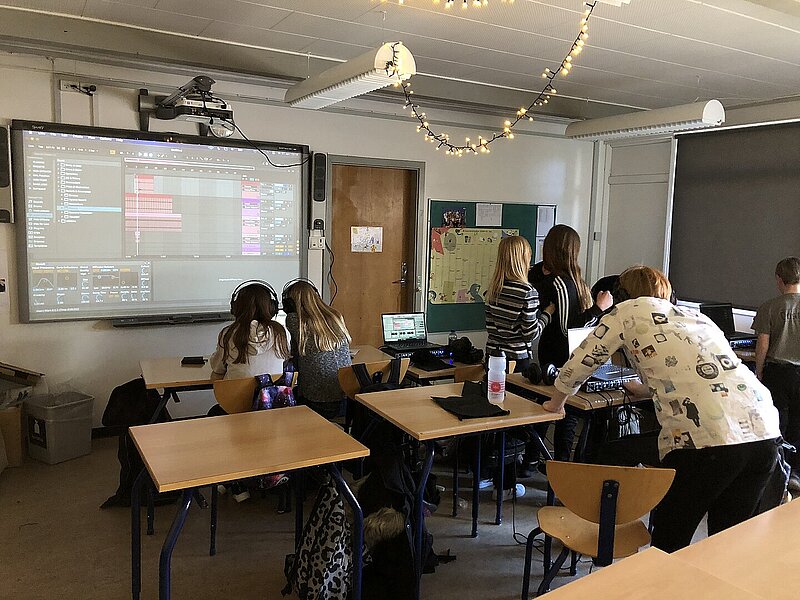
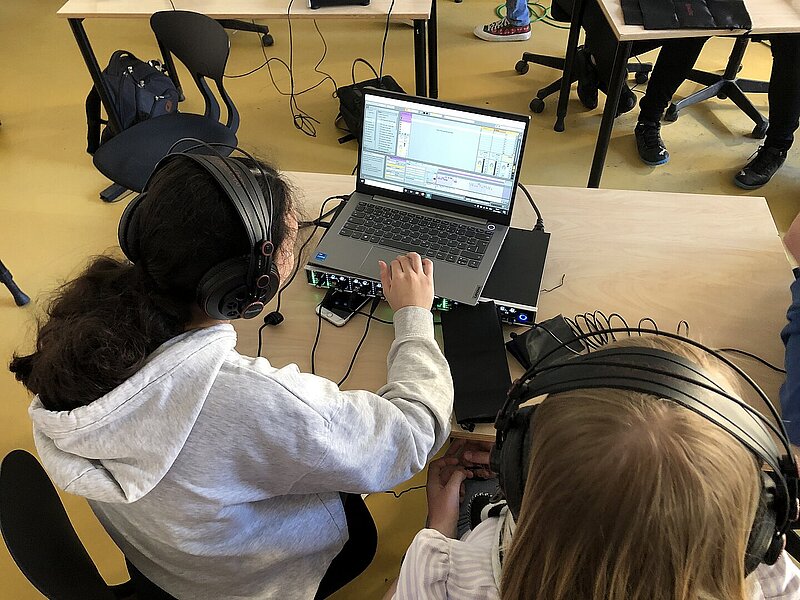
36 individual workstations were purchased with a PC with Ablton Live intro installed, Launchpad midi controller, headphone amplifier and headphones so that the children, in most cases, could work together in pairs.
As a side effect of the Corona pandemic, which meant that the German team of educators had to work online with their students, it was decided to produce a series of educational videos to introduce Ableton. The Danish students translated and narrated several technical videos with associated tasks. The videos were intended to prepare the students before we started the actual workshops and creative work.
Content of the workshops
In the following, I will describe the content, structure and approaches of the three different courses.
In general, students in all three classes were informed about the objectives and content of the days' work ahead. They were also given a short presentation of the students and their individual artistic expression.
5th grade
In 5th grade at Sydfalster School, the program was designed based on a desire to begin the teaching by letting the students try out attentive and reflective listening through a soundwalk with specific exercises.
The students walked to the nearby city pond and were asked to stand in silence at a distance from each other. Then they had to listen!
The listening tasks they were given:
- Listen for and define nature's own sounds, e.g. trees, wind, birds, etc. - followed by a short dialog.
- Listen for the man-made sounds in the area. E.g. cars, airplanes, industry, etc. - again followed by a dialog.
- The third task was for the students to focus on a single sound, then another sound, and finally to hold another sound in their minds. The students then tried to pay attention to the spatial location and relationship of the sounds within each other. Far away/near - deep/loud - dark/light - constant/rhythmic etc.
After a longer dialog about the listening experience, the students were introduced to the small handheld recorders that they would use to collect and preserve their field recordings.
They were given 3 tasks:
- Record 2 ambient sounds - sounds that contribute to the snapshot of the surrounding soundscape. Sounds that resonate without the influence of the children.
- Record 3 percussive sounds - relatively short sounds with a definable attack, such as recordings of things being struck.
- Listen and record sounds underwater in the street pond with hydrophones
These collected sounds had to be edited and processed in Ableton. This was a challenge, as the students had never worked with the program until this point. So it was a difficult exercise to introduce the students to Ableton at the same time as they had to relate to their recordings.
After editing and processing the recordings, the students were introduced to Ableton's composition interface "Arrangement view", where they had to use midi instruments and "dot" notes into "piano roll". The students quickly realized that it was easy to work with the Launchpad as a midi controller, with some help and guidance, the children created both melody, bass and drum rhythms.
The children then worked on their pieces, using recordings from the start as musical elements. At the end of the program, the students talked about their works and played them for the class.
6th grade
Here the student chose to start by sharing 2 field recordings with the students - a recording of waves and a recording of seagull cries. In addition, they were given a recording of Beethoven's Pastorale The students had to work on manipulating and sound-shaping these recordings during the first day. They were introduced to some of Ableton's unique audio manipulation capabilities and a few of Ableton's audio effects. The children explored and experimented with stretching, reversing, transposing and cutting the sounds. They were introduced to how reverb and delay work, and through this they gained knowledge and insight into actual sound design/sound shaping. These small investigations were carried on over the next few days and were incorporated to varying degrees in the finished works.
Day 2 started with the students receiving a brief instruction on the digital recorders and a handful of tasks to be solved in their two-person work groups
The assignments:
- Record something outside
Record something inside - Record a sound you actively make
- Record a sound you are not making
- Record percussive sounds for kick drum, snare, hihat
The students were imaginative and creative. The students got some pretty good and fun recordings of little "interviews" they did with each other and different teachers from the school.
The recordings were to be put into Ableton's Drumrack and used as the rhythmic basis for their works. In the process, the students also discovered the drum presets available in Ableton. The student seized the impulse and the students got a quick instruction on how to program midi clips in piano roll, both rhythmically, melodically and harmonically.
The last part of the course was spent on individual guidance in the groups, both in terms of technical and artistic challenges and choices.
All groups created a piece of music that was presented on the last day of class.
7th grade
In this large group of students, Ableton was introduced based on the student's own artistic and creative process. The students started by creating their own melodies. They were informed about the possibilities for limiting the tonal material built into Ableton. You can lay a scale over the piano roll - the midi sequencer - so that it only plays the notes that belong to a certain scale. The students would then more or less randomly dot notes into a short loop and then work with the melody, e.g. take notes out, write more in, change note length.
Students would then compose variations based on their first melody. This workflow continued with a bass part. Along the way, a few different Ableton audio effects were introduced and students were given the opportunity to jam with their little melody and bass part variations.
The students had to record their own samples to be included in the works. They were instructed on how to use the recorders and given the following tasks:
- Record a deep sound,
- A high sound (Pitch)
- A long sound
- A sound with a tone.
These sounds were loaded into Ableton's Drumrack. The students were introduced to the possibilities of shaping the sounds with clipping, pitch, stretch, filtering etc. After this work, the students now had their own drum samples to use in their works.
In this group, Beethoven's Pastorale was introduced as samples in a piece composed for the occasion by the student. Unfortunately, there were some obstacles in the process of sharing the Pastorale with the students, so only a few groups had the time and energy to try working with the sample from a hip-hop/lo-fi approach. An approach where melody fragments, chord progressions or rhythmic content form the basis for paraphrases and own works.
In the final part of the course, time was spent on individual guidance, and finally a viewing of the works.
Evaluation of the courses - including general observations and opinions
When planning and implementing the courses, it was clear that Ableton Live would be a challenge - it's a difficult platform to restrict and frame while at the same time opening up for exploration and experimentation in the creative and artistic field.
It's quite a long way from a basic understanding of the program to actually being able to work creatively with it.
The collaboration with Guldborgsund Municipality and Stiftung Neue Musik-Impulse will continue in the coming years, so we evaluated from a future perspective - very specifically around the challenges with Ableton and the student group.
The videos produced before the program started contained user guides for Ableton's various functions as well as exercises for each topic. The intention was for students to watch the videos and complete the tasks before the course started. In this first course, there wasn't enough time, so only one class had seen the intro video that goes through Ableton's interface. In future courses, it would be optimal for the creative part of the course to have reviewed these videos and assignments so that the technical challenges of the platform do not stand in the way of creative thoughts and wishes.
In the course, we educated for three days from 8:00 to 14:00. In the next program in 2022, we will try to have five days of teaching from 8:00 to 12:00 to avoid wearing students out. We will include tightly scripted assignments on the first day to optimize the understanding of Ableton and to prepare for the creative work on the following days.
We also realized that:
- in plenary situations, educators should use exactly the same platform, which is exactly the same version and has exactly the same appearance as the students' work computers. This avoids a lot of unnecessary questions and confusion that just takes focus.
- It's important to make sure there are no obstacles to sharing or moving files, for example.
- Good things can come from scheduling joint listening of student work - preferably as a daily occurrence.
- We must be careful not to allow "taste judgments" between students.
- the creative process is the most fun and educational for both students and educator.
- it's fine to use both soundwalks and field recordings - they should only be used later in the course, and possibly as a respite from the screens.
- It can be a good idea to (up)find systems that can generate data when the students' batteries are running low, so that the data found can be translated into e.g. rhythms, melodic and/or harmonic elements, form etc. These elements can later be tested and used in the works.
- Working with sound shaping/sound design without a fixed rhythm and form is both educational and fun.
- It can make sense to go through a basic element and then guide individually afterwards - also in the creative process.
- we must remember to seize the children's impulses and use them.
- It can be instructive to sound design "blind" - turning the knobs in an effect or synthesizer without listening. And only afterwards to hear what came out of it, and possibly use the sound in the piece you're working on.
- It could be valuable and give students greater ownership if it were possible to export the works so that they can be used as ringtones on their cell phones.
- The musical content could be intertwined with a visual art element - stop motion, photo, collage, video, etc.
A few of the statements from the evaluation:
"Keep it Simple - Keep it Fun" - "It was a lot of fun, and frustrating... and fun!"